Restaurant POS system Philippines: what TAYP v2 changed
TAYP v2 is a restaurant POS rebuilt from zero: one order list, a kitchen board with timers, a free POS, and one ledger for the money.
If you are looking for a restaurant POS system in the Philippines, TAYP v2 is a full rebuild, not an update. Five changes matter most to an owner: one dashboard for every branch, one order list, a kitchen board with timers, a free POS, and every peso on one ledger.
Here they are, in the order you will meet them.
Can I run several branches from one dashboard?
Yes. Switch between branches from the same dashboard, or look at all of them together, so you do not log in to each one. The menu works the same way. A dish can have a different price in each branch, so the branch with the higher rent does not have to share a price with the one beside the market.
With one branch, nothing changes shape. The order list, the kitchen board, the POS and the Wallet work the same way, and the branch switch is there for the day you open a second.
Where do my orders show up?
In one list. The Orders list holds orders from your website, from the POS at the counter, and from the QR code on the table. Each order shows where it came from and whether it is paid, so nobody has to ask whether table 4 paid already.
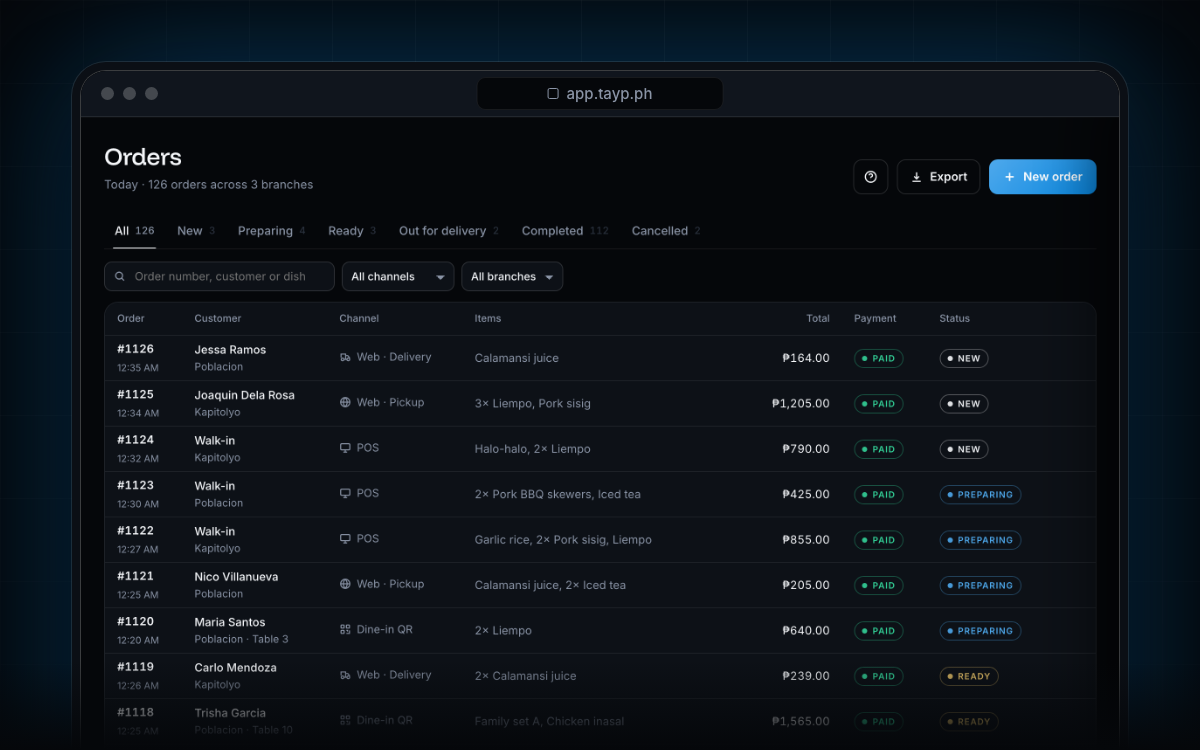 Website, POS and table QR orders in one list. The Payment column shows which ones are paid. Demo store.
For the website side, read how your restaurant's own ordering website works. For the table side, read QR ordering from the table to the kitchen.
How does the kitchen board work?
The board has three columns: New, Preparing and Ready. A chime plays when a new order arrives, so the cook does not have to keep watching the screen.
Each ticket has a timer that counts from the moment the order came in. A ticket that has waited 15 minutes without being Ready turns orange. Tap Start to move a ticket to Preparing, and Ready to move it on.
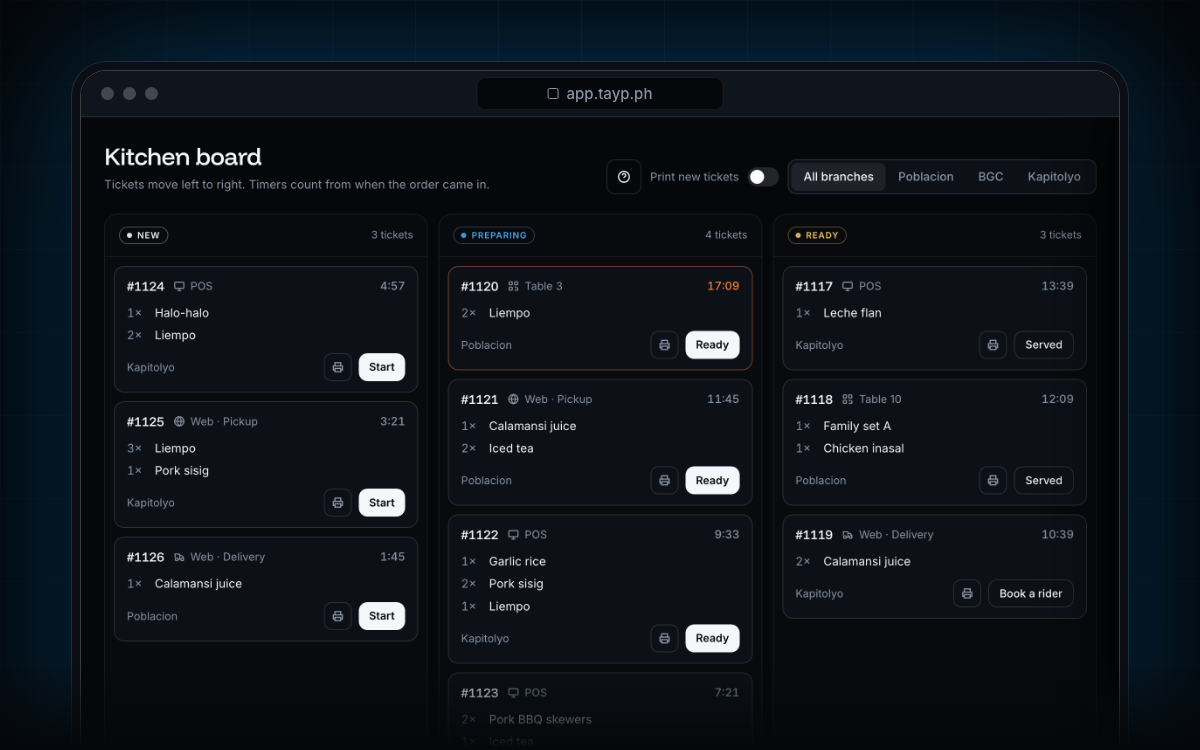 The orange ticket has waited past 15 minutes without being Ready. Demo store.
The step-by-step is in how the kitchen board works: the chime, the ticket, the timer.
Is the POS really free, and what do the paid plans cost?
Yes. The Free POS is ₱0 a month for 1 branch, 1 register and 3 staff, with unlimited products and sales. It is a plan, not a trial, so you can sell on it for as long as you like.
On the POS you tap a dish to add it, choose dine-in, takeout or delivery, and hold an order while the customer decides. Each payment is recorded as cash, QR Ph, GCash, Maya or card. Receipts on the Free POS end with “Powered by tayp_”. The full list is in Free POS: what ₱0 a month includes.
Your own ordering website, the kitchen board and more branches are on the paid plans. Starter is ₱6,199 a month and Growth is ₱11,999 a month. Six months is 10% off, and a year is 20% off. Enterprise is custom.
Where are my earnings kept?
The Wallet keeps your earnings and your delivery credit on one ledger. What came in and what went out sit in one place, so you do not need a second spreadsheet to check the first. You withdraw to a bank account or an e-wallet.
Next, read why we rebuilt TAYP from zero for the reasons behind these changes. If you ran the older version, Your Branches Should Not Tell Different Stories was written before the rebuild. To try a table menu first, the free QR menu tool needs no login. When you are ready, see the restaurant plans.
See it working in TAYP.
One command center for your products, orders, payments and delivery, set up and managed for you.